Help! My printed PDF pages are so small that they’re ruining my vision!
December 7, 2007 8:48 PM Subscribe
Using Preview for PDFs, what can I do to maximize the size of the text as they appear on printouts?
The Details: My PDF browser of choice is Preview (4.0, the most recent version), which I use on my MacBook. I do have Adobe, but I would like to find a solution using Preview if at all possible.
The Motivation: In an effort to save paper and money, I am trying to print some PDF documents in the following way: two pages per side, on both sides of the paper (the “both sides” issue was easy enough to figure out). Essentially, I want to maximize my use of the amount of space available per page.
The Dilemma: I am having difficulty, however, printing two pages side-by-side in a way that is actually readable without me having to strain my eyes.
What I am going for is this: look! totally legible! (Please disregard the grey line down the middle. This is simply to illustrate how much of the page I would like the text to cover.)
...but what I inevitably get is this: what the hell? hand me that magnifying glass, would ya? (That's a bit too much margin, even for me!)
Things I Have Tried which Have Not Solved My ProblemTM:
• Cropping the pages (to reduce margin size) in Preview
• Increasing the default zoom to 125% in Preferences
• Using “Borderless” Printing (this just causes the text to spill off the page)
• Scaling the pages “to fit the page” in the printing command window
• Searching all available “help” documents pertaining to Preview (to no avail)
Are there any hidden tips that I am missing? Is there nothing I can do? If this is the case, is there a better software out there that is Mac OSX compatible, and that will allow me to print two PDF pages side-by-side in a size that is actually useful?
Help me, hivemind! I will be forever indebted to you, as my immediate research and future academic endeavors depend on it.
Note: I’m aware that there are a great many wonderful electronic PDF readers out there, many of which I lust after (I have seen this post), but I am not currently in the financial position to buy one, nor would one solve my problem as I need to have these materials portable and in my hands ASAP!
The Details: My PDF browser of choice is Preview (4.0, the most recent version), which I use on my MacBook. I do have Adobe, but I would like to find a solution using Preview if at all possible.
The Motivation: In an effort to save paper and money, I am trying to print some PDF documents in the following way: two pages per side, on both sides of the paper (the “both sides” issue was easy enough to figure out). Essentially, I want to maximize my use of the amount of space available per page.
The Dilemma: I am having difficulty, however, printing two pages side-by-side in a way that is actually readable without me having to strain my eyes.
What I am going for is this: look! totally legible! (Please disregard the grey line down the middle. This is simply to illustrate how much of the page I would like the text to cover.)
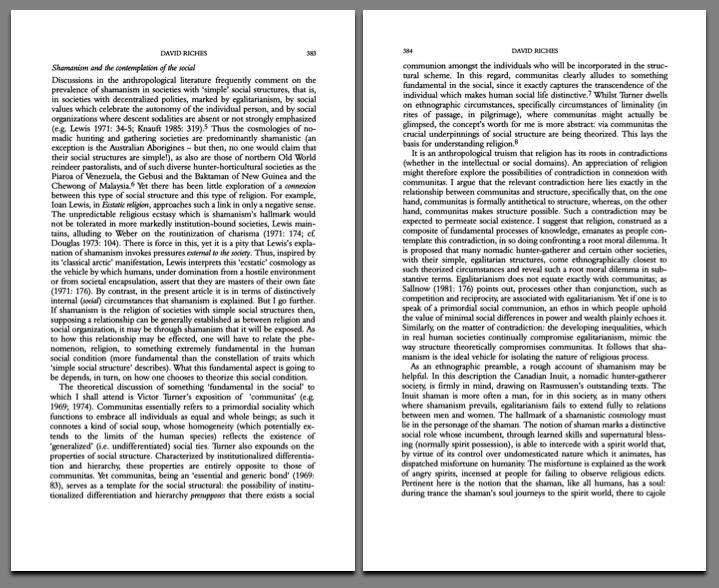
...but what I inevitably get is this: what the hell? hand me that magnifying glass, would ya? (That's a bit too much margin, even for me!)

Things I Have Tried which Have Not Solved My ProblemTM:
• Cropping the pages (to reduce margin size) in Preview
• Increasing the default zoom to 125% in Preferences
• Using “Borderless” Printing (this just causes the text to spill off the page)
• Scaling the pages “to fit the page” in the printing command window
• Searching all available “help” documents pertaining to Preview (to no avail)
Are there any hidden tips that I am missing? Is there nothing I can do? If this is the case, is there a better software out there that is Mac OSX compatible, and that will allow me to print two PDF pages side-by-side in a size that is actually useful?
Help me, hivemind! I will be forever indebted to you, as my immediate research and future academic endeavors depend on it.
Note: I’m aware that there are a great many wonderful electronic PDF readers out there, many of which I lust after (I have seen this post), but I am not currently in the financial position to buy one, nor would one solve my problem as I need to have these materials portable and in my hands ASAP!
How are you getting your two-up pages now? Just through the print dialog, right?
posted by nathan_teske at 9:52 PM on December 7, 2007
posted by nathan_teske at 9:52 PM on December 7, 2007
Response by poster: emelenjr: (1) The maximize button appears to only increase the size of the window itself (no effect on the text on the screen); (2) pressing Command+0 appears to maximize the size of the text as it appears on-screen in the Preview browser, but has no effect on the size of the printed text.
posted by numinous at 9:56 PM on December 7, 2007
posted by numinous at 9:56 PM on December 7, 2007
Response by poster: nathan_teske: Yes, I am going through the print dialog window. Is there a super-secret, hack-y way to adjust this process that I am unaware of?
(I am a luddite compared to a lot of mefi-ers.)
posted by numinous at 9:59 PM on December 7, 2007
(I am a luddite compared to a lot of mefi-ers.)
posted by numinous at 9:59 PM on December 7, 2007
No you're doing it right... do you have the correct page size selected? It's hard to tell from a raster image like that, but to me it almost looks like you either have an incorrect page size or pagescaling applied.
posted by nathan_teske at 10:09 PM on December 7, 2007
posted by nathan_teske at 10:09 PM on December 7, 2007
This is always a problem for me too -- esp. with academic articles that have these huge margins. I never use the preferences in Preview to scale, and I can always print two-up with no problem. The difference is to scale with page setup. Go into page setup (File->page setup or just shift-command-P). In the scale box type 125, then click ok. Then go to Print, and do layout->2 pages per sheet. Then click preview from the print dialog box and check your margins. If they're still too big, go back and increase the page setup scale. If you've cropped off some of the text, you need to reduce the percentage. I find that most of the time 125-135% works for articles I get from Jstor.
posted by tractorfeed at 10:49 PM on December 7, 2007
posted by tractorfeed at 10:49 PM on December 7, 2007
Aight, I played around a bit and I think I may have found the root of the problem? There are multiple boxes that define various areas in PDFs. The crop box and the media box are the two we care about. The crop box defines the viewable area of the PDF, but there is sometimes data outside of that. The media box contains everything in the file. It seems that Preview prints based on the media box, not the crop box, and it's possible that your PDF has a larger media box, creating larger margins when you print.
Open the PDF and go to View>PDF Display>Media Box. If you see a larger file then that's your issue. If not then you've got other problems.
If it is your issue, then, damn. I'm looking around for a good way to crop PDFs to the crop box (because the crop box doesn't crop the PDF, of course) or an alternate viewer/printer that will get you where you want to go. Stay tuned. If you don't hear from me it means I fell asleep instead.
posted by wemayfreeze at 1:58 AM on December 8, 2007
Open the PDF and go to View>PDF Display>Media Box. If you see a larger file then that's your issue. If not then you've got other problems.
If it is your issue, then, damn. I'm looking around for a good way to crop PDFs to the crop box (because the crop box doesn't crop the PDF, of course) or an alternate viewer/printer that will get you where you want to go. Stay tuned. If you don't hear from me it means I fell asleep instead.
posted by wemayfreeze at 1:58 AM on December 8, 2007
Aw, heck. Maybe I'm totally wrong. Maybe I'm straight trippin. Maybe not, though? Maybe I'll figure it out in my sleep. MAYBE!
posted by wemayfreeze at 2:29 AM on December 8, 2007
posted by wemayfreeze at 2:29 AM on December 8, 2007
As was suggested above, you need to make adjustments to Page Setup. Also, if you want to print two letter-sized pages on a single sheet, I recommend using legal sized paper for a better fit with bigger text.
posted by reeddavid at 11:45 AM on December 8, 2007
posted by reeddavid at 11:45 AM on December 8, 2007
Unfortunately, there is no Page Setup in Preview (maybe just Leopard Preview?).
1. Have you tried the Scale option in the Print dialog?
2. When you crop the PDF and try to print, is there no visible change at all? Or is the change just not enough to suit you?
If you're still having problems, post the PDF you're using somewhere (just a couple pages of it will do) and I'll have a hack at it.
posted by wemayfreeze at 12:30 PM on December 8, 2007
1. Have you tried the Scale option in the Print dialog?
2. When you crop the PDF and try to print, is there no visible change at all? Or is the change just not enough to suit you?
If you're still having problems, post the PDF you're using somewhere (just a couple pages of it will do) and I'll have a hack at it.
posted by wemayfreeze at 12:30 PM on December 8, 2007
Ok, one last idea here. It's possible that Preview is scaling two 8.5x11-sized pages with your images on them onto one page, instead of two smaller-sized pages. Does that make sense?
In the Print dialog, set the paper size to the actual size of your document (open the Inspector [command+I] to see the actual size; in the Paper Size drop-down select Manage Custom Sizes… and add that size with zero margins). Now try to print 2-up. If that doesn't work, use the same settings but save the print as a PDF (in the PDF drop-down in the Print dialog). When I just tried that, it saved an 11x8.5 PDF with two custom-sized pages on it, instead of two scaled 8.5x11 pages.
posted by wemayfreeze at 12:38 PM on December 8, 2007
In the Print dialog, set the paper size to the actual size of your document (open the Inspector [command+I] to see the actual size; in the Paper Size drop-down select Manage Custom Sizes… and add that size with zero margins). Now try to print 2-up. If that doesn't work, use the same settings but save the print as a PDF (in the PDF drop-down in the Print dialog). When I just tried that, it saved an 11x8.5 PDF with two custom-sized pages on it, instead of two scaled 8.5x11 pages.
posted by wemayfreeze at 12:38 PM on December 8, 2007
Response by poster: tractorfeed, your method worked well for me solving this issue using the Adobe reader, but as wemayfreeze points out, there is no "Page Setup" option in Preview 4.0.
wemayfreeze:
1. I have tried the Scale option in the Print dialog, and there is no noticeable difference, unless I select the option to Scale Down, after which the text is even SMALLER than it was initially!
2. Cropping the PDF has no effect whatsoever on the printout.
I am running out for the afternoon, but I will have a go at your last suggestion a bit later.
And since I haven't mentioned this already, I really appreciate all of your help and suggestions. So thank you!
posted by numinous at 3:01 PM on December 8, 2007
wemayfreeze:
1. I have tried the Scale option in the Print dialog, and there is no noticeable difference, unless I select the option to Scale Down, after which the text is even SMALLER than it was initially!
2. Cropping the PDF has no effect whatsoever on the printout.
I am running out for the afternoon, but I will have a go at your last suggestion a bit later.
And since I haven't mentioned this already, I really appreciate all of your help and suggestions. So thank you!
posted by numinous at 3:01 PM on December 8, 2007
Can you email me a copy of the PDF? I'd like to see if you have an oddball PDF or an oddball setup.
posted by nathan_teske at 3:17 PM on December 8, 2007
posted by nathan_teske at 3:17 PM on December 8, 2007
Sorry for the misinformation. I just checked the File menu in Preview; where did Page Setup go? It's been there up through Tiger, right?
posted by reeddavid at 3:20 PM on December 8, 2007
posted by reeddavid at 3:20 PM on December 8, 2007
Best answer: Sorry, I didn't take into account your Preview version. I just went to my laptop, running 4.0, and got this to work (giving identical results to the old Tiger way of doing things):
Don't change anything in preferences.
Go to the File --> Print dialog box
Uncheck "Automatically rotate each page"
Select "No automatic page scaling"
In the "scale" box, enter 125 (or whatever)
In the Layout menu (you get to this by clicking on the menu that defaults to "Preview"), choose 2 pages per sheet (note that this will not update the automatic preview on the left side of the pane the way that choosing a new scale percentage will)
Click on the PDF pull down menu in the lower left corner and choose "Open pdf in preview" and you should have what you're after. Check for legibility/clipping, readjust scale percentage if necessary, then print.
posted by tractorfeed at 12:38 PM on December 9, 2007
Don't change anything in preferences.
Go to the File --> Print dialog box
Uncheck "Automatically rotate each page"
Select "No automatic page scaling"
In the "scale" box, enter 125 (or whatever)
In the Layout menu (you get to this by clicking on the menu that defaults to "Preview"), choose 2 pages per sheet (note that this will not update the automatic preview on the left side of the pane the way that choosing a new scale percentage will)
Click on the PDF pull down menu in the lower left corner and choose "Open pdf in preview" and you should have what you're after. Check for legibility/clipping, readjust scale percentage if necessary, then print.
posted by tractorfeed at 12:38 PM on December 9, 2007
Response by poster: Yay tractorfeed! Your advice (which was quite clear and very user-friendly) solved my issue entirely, and have helped save the trees and my eyesight!
Thank you to everyone who offered suggestions and helped me work through the process. AskMefi has proven to be an invaluable resource time and time again, and this post serves to reinforce my appreciation of this community.
I would send you all cupcakes if I could! Instead, I will be printing merrily with all of you in mind.
posted by numinous at 5:33 PM on December 10, 2007
Thank you to everyone who offered suggestions and helped me work through the process. AskMefi has proven to be an invaluable resource time and time again, and this post serves to reinforce my appreciation of this community.
I would send you all cupcakes if I could! Instead, I will be printing merrily with all of you in mind.
posted by numinous at 5:33 PM on December 10, 2007
Response by poster: ...and has helped save the trees and my vision.
...though that much can't be said about my grammar! Oops.
posted by numinous at 8:32 PM on December 10, 2007
...though that much can't be said about my grammar! Oops.
posted by numinous at 8:32 PM on December 10, 2007
« Older How to create a unique osx automator action that... | If I tell you I'm bipolar, will that make you run... Newer »
This thread is closed to new comments.
What happens when you press Command-0 (zero)?
posted by emelenjr at 9:34 PM on December 7, 2007