I need help cleaning some dirty data
March 18, 2009 11:34 AM Subscribe
Excel-filter: Mysterious single-quotes that precede the data in each cell. How do I get rid of them?
I'm working with a spreadsheet that's several years old. I suspect that the spreadsheet was created from a CSV file initially, but it was done before my time so I don't know for sure. Every entry in the first two columns is preceded by a single-quote. I think this was originally to force the text into..well, text, format that is. However, this character is causing these entries to not match other entries with the same text, sans single quote, which is a big problem for me. Things I've tried to get rid of these annoying characters:
=Clean()
Text->Columns
Changing the format (text, number, etc)
=Right(A1, Len(A1)-1) //this one chops off the first real character and leaves the single quote
Find & Replace using a copy/pasted single quote from an afflicted cell
Example of afflicted data, copy/pasted right from the spreadsheet:
Nothing has worked except manually editing the cell and removing the character. Since I'm dealing with upwards of 10k cells, I really don't want to do this manually. Haven't managed to come up with anything on Google either. I'm using Excel 2007, though the file is .xls (rather than 2k7's .xlsx).
I'm not very good with macros, but willing to try them if they'll help.
I'm working with a spreadsheet that's several years old. I suspect that the spreadsheet was created from a CSV file initially, but it was done before my time so I don't know for sure. Every entry in the first two columns is preceded by a single-quote. I think this was originally to force the text into..well, text, format that is. However, this character is causing these entries to not match other entries with the same text, sans single quote, which is a big problem for me. Things I've tried to get rid of these annoying characters:
=Clean()
Text->Columns
Changing the format (text, number, etc)
=Right(A1, Len(A1)-1) //this one chops off the first real character and leaves the single quote
Find & Replace using a copy/pasted single quote from an afflicted cell
Example of afflicted data, copy/pasted right from the spreadsheet:
'10807268Nothing has worked except manually editing the cell and removing the character. Since I'm dealing with upwards of 10k cells, I really don't want to do this manually. Haven't managed to come up with anything on Google either. I'm using Excel 2007, though the file is .xls (rather than 2k7's .xlsx).
I'm not very good with macros, but willing to try them if they'll help.
=Right(A1, Len(A1)-1) really doesn't work for you? Just to double check that, I copied/pasted your example into my Excel and then that formula right next to it and it works for me. Maybe there is something weird about this quote mark and its not roundtripping through mefi correctly?
posted by jeb at 11:39 AM on March 18, 2009
posted by jeb at 11:39 AM on March 18, 2009
Try selecting the column and changing the justification (like to centered), then changing it back to right justified.
posted by Yorrick at 11:41 AM on March 18, 2009
posted by Yorrick at 11:41 AM on March 18, 2009
The single apostrophe reflects a previous effort to show the numbers as text. To repair...
Highlight all of the affected cells.
Note little diamond with exclamation point that appears to the right.
Click downward arrow
Choose "Convert to Number."
posted by carmicha at 11:41 AM on March 18, 2009
Highlight all of the affected cells.
Note little diamond with exclamation point that appears to the right.
Click downward arrow
Choose "Convert to Number."
posted by carmicha at 11:41 AM on March 18, 2009
Response by poster: Copy/Paste Special Values doesn't work. Changing justification doesn't do anything either. And I don't get the alert (diamond with !) when I select the cells.
I'm usually pretty good at figuring this sort of thing out, but I'm not having any luck except manual removal so far. Thanks for the suggestions - any other ideas I might try?
posted by ashirys at 11:58 AM on March 18, 2009
I'm usually pretty good at figuring this sort of thing out, but I'm not having any luck except manual removal so far. Thanks for the suggestions - any other ideas I might try?
posted by ashirys at 11:58 AM on March 18, 2009
Maybe this is too simple, but it solved this problem for someone at my office recently.
-select all the cells with the quotes
-click Edit/Replace (or CTRL+f)
-click on the Replace tab
-enter a quote in Find What field
-in the Replace With field hit Delete
-click Replace All
That solved it for my colleague.
posted by jackmcc at 12:05 PM on March 18, 2009
-select all the cells with the quotes
-click Edit/Replace (or CTRL+f)
-click on the Replace tab
-enter a quote in Find What field
-in the Replace With field hit Delete
-click Replace All
That solved it for my colleague.
posted by jackmcc at 12:05 PM on March 18, 2009
Response by poster: Progress, of sorts! Thanks, Doofus.
=Value(A1) works for the column of numbers. That's good. The other affected column has non-numeric data (I neglected to mention that initial question, sorry), and value doesn't work there. I may be able to get what I need by just fixing the numbers, but further suggestions for the text column are appreciated as well.
Find/Replace definitely does not work here.
posted by ashirys at 12:08 PM on March 18, 2009
=Value(A1) works for the column of numbers. That's good. The other affected column has non-numeric data (I neglected to mention that initial question, sorry), and value doesn't work there. I may be able to get what I need by just fixing the numbers, but further suggestions for the text column are appreciated as well.
Find/Replace definitely does not work here.
posted by ashirys at 12:08 PM on March 18, 2009
Maybe =TRIM(A1) on the non-numeric column, and then a paste->special?
posted by Doofus Magoo at 12:09 PM on March 18, 2009
posted by Doofus Magoo at 12:09 PM on March 18, 2009
Sorry, that should be Paste Special->Values. And thinking about it now, the TRIM() is probably redundant -- maybe just =A1, and then a Paste Special->Values.
posted by Doofus Magoo at 12:10 PM on March 18, 2009
posted by Doofus Magoo at 12:10 PM on March 18, 2009
Response by poster: No dice with =Trim(), unfortunately. Or =A1.
It's a tenacious little bugger, it seems. Thanks again for the suggestions.
posted by ashirys at 12:18 PM on March 18, 2009
It's a tenacious little bugger, it seems. Thanks again for the suggestions.
posted by ashirys at 12:18 PM on March 18, 2009
Is the single-quote visible in the cell for the non-numeric ones?
posted by Doofus Magoo at 12:21 PM on March 18, 2009
posted by Doofus Magoo at 12:21 PM on March 18, 2009
Response by poster: It's only visible in the editbox. Screenshot
posted by ashirys at 12:29 PM on March 18, 2009
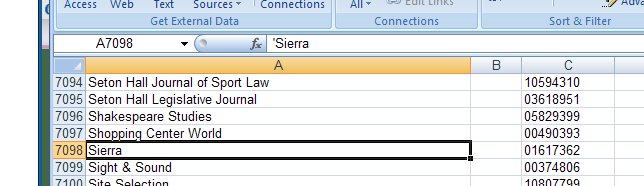
posted by ashirys at 12:29 PM on March 18, 2009
Best answer: Can you copy the column with the single quote into a new spreadsheet (which in my test got rid of the single quote) and then copy it back? Or copy it into Word, perhaps do a find/replace there, and then copy it back?
posted by marylynn at 12:33 PM on March 18, 2009
posted by marylynn at 12:33 PM on March 18, 2009
Best answer: (1) Copy the first two columns to another spreadsheet
(2) Save it as a csv
(3) Open the csv in a text editor
(4) Search and replace ",`" with "," or just "`" with "".
(5) Save file in text editor
(6) Open resulting csv in excel, paste first two columns over original two columns
posted by ROU_Xenophobe at 12:37 PM on March 18, 2009
(2) Save it as a csv
(3) Open the csv in a text editor
(4) Search and replace ",`" with "," or just "`" with "".
(5) Save file in text editor
(6) Open resulting csv in excel, paste first two columns over original two columns
posted by ROU_Xenophobe at 12:37 PM on March 18, 2009
Response by poster: Marked all the answers that worked. You guys are life-savers, thanks!
posted by ashirys at 12:44 PM on March 18, 2009
posted by ashirys at 12:44 PM on March 18, 2009
This thread is closed to new comments.
posted by mullacc at 11:39 AM on March 18, 2009